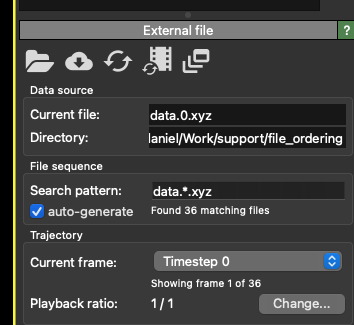
I am recording an animated movie from lammps data frames named e.g data.1 data.2 … data.10 .. data.12 .. data.22 etc. Because of the typical unix naming convention files will be read in ovito data.1, data.10, data.11, data.111, data.2 etc. That is not usually a problem. However I would like to change the order of the frames to a custom one that has them in the right order for the rendering. I don’t think that there is any way of doing that in the current version of OVITO. Does this request make sense ? Or does anyone know how to do it within the current implementation?
I think you are trying to fix the problem from the wrong side. Just rename your files so that they are zero padded and the issue does not happen anymore. Example:
for old in $(seq 1 10) ; do new=$(printf "%06d" $old); mv -vi data.$old data.$new; done
When loading files into OVITO, it will do its best to figure out the correct ordering of your files.
When you load a single file — either from the open file dialog or the terminal, e.g. ovito data.1 — OVITO will internally build the pattern data.* and attempt to find additional files in that sequence. All data files found this way are added to the timeline in correct numerical order.
Please note that the “auto-generate” box in the GUI needs to be checked for this auto-detection to happen.
When you provide OVITO with a list of files on the command line, the files will be added to the timeline in that order: ovito data.30 data.20 data.10 will add frames 30, 20, and 10 to the timeline in exactly that order. This means that when you run ovito data.*, your shell will expand the * in lexicographical order and add them to OVITO’s command-line options — ovito data.* → ovito data.1 data.10 data.2 data.20 ... — and OVITO will add them to the timeline in this lexicographical order. For correct ordering, something like ovito data.{0..111} needs to be used so that the shell is already providing a correctly ordered list of files to OVITO.
In your case, the best solution would be to simply open data.0 using ovito data.0 and let OVITO handle file discovery and ordering on its own.
We found a small bug in our existing implementation. Starting from OVITO 3.15.4, running ovito 'data.*' should work, and OVITO will now correctly discover and load all files matching the pattern.
Please note the single quotes around the * wildcard, which prevent your shell from expanding it and allow OVITO to handle the pattern directly (see my previous reply for more details).
The easiest solution is to create zero-padded filenames from the very beginning in your LAMMPS input file. That will also help with any kind of custom scripts and directory listings.