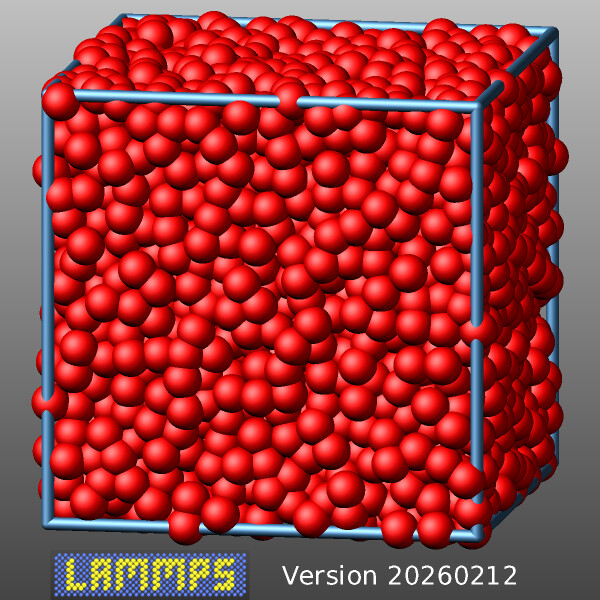
Recent LAMMPS releases have added a new GRAPHICS package with several commands that can add extra graphics to visualizations created with the internal dump image command.
Here is a simple example demonstrating how to add graphics from an image and text with $variable expansion similar to fix print to a visualization (using the melt example input as a base):
# 3d Lennard-Jones melt

units           lj
atom_style      atomic

lattice         fcc 0.8442
region          box block 0 10 0 10 0 10
create_box      1 box
create_atoms    1 box
mass            1 1.0

velocity        all create 3.0 87287 loop geom

pair_style      lj/cut 2.5
pair_coeff      1 1 1.0 1.0 2.5

neighbor        0.3 bin
neigh_modify    every 20 delay 0 check no

fix             1 all nve

# dump image frequency
variable vizsteps index 100

# add image and text
fix     logo all graphics/labels ${vizsteps} image lammps-logo.png 150 25 0 scale 0.5
fix     text all graphics/labels ${vizsteps} text "Version $(version)" 400 25 0

dump viz all image ${vizsteps} myimage-*.png type type size 600 600 zoom 1.452 &
                               shiny 0.6 fsaa yes view 80 10 box yes 0.03  center s 0.5 0.5 0.45 &
                               fix logo type 1 0  fix text type 1 0
#                              ^^^^ include graphics in images ^^^^
dump_modify viz pad 6 boxcolor steelblue backcolor darkgray backcolor2 silver adiam 1 1.5

thermo  50
run     500
This is what it looks like: