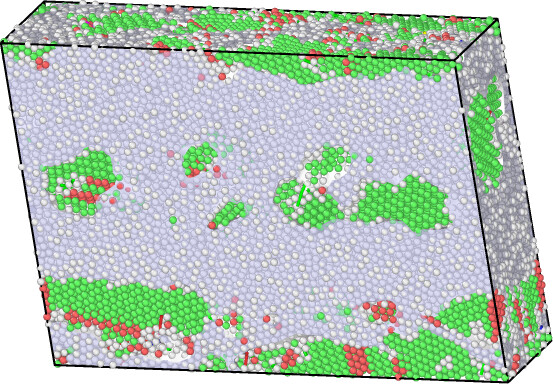
Could anyone tell me how to hide the defect mesh and particles before rendering the image, and only retain the dislocation lines?
# import ovito python modules
import os
from ovito.io import import_file
from ovito.vis import Viewport
from ovito.modifiers import SelectTypeModifier, DislocationAnalysisModifier

# specify input file path and root path
input_path = r"F:\GitHubRepos\MDSimulation\LAMMPS-Practices\shear_compress\adp_Apostol2011_small\shear_compress.adp_Apostol2011-4.in_20251127233525_1764258266527_348\AlCuLMC_deformation.lmp"
# input_path = r"F:\GitHubRepos\MDSimulation\LAMMPS-Practices\shear_compress\adp_Apostol2011_full\shear_compress.adp_Apostol2011-5\AlCuLMC_deformation.lmp"
root_path = os.path.dirname(input_path)

# specify the pipeline and add modifiers
pipeline = import_file(input_path)
pipeline.add_to_scene()
select_modifier = SelectTypeModifier(operate_on='particles',property='Particle Type',types={1, 4})
pipeline.modifiers.append(select_modifier)
dxa_modifier = DislocationAnalysisModifier(only_selected=True)
dxa_modifier.input_crystal_structure = DislocationAnalysisModifier.Lattice.FCC
pipeline.modifiers.append(dxa_modifier)

outpath = os.path.join(root_path, f"Dislocations_{10:02d}.png")
vp = Viewport(type=Viewport.Type.Ortho, camera_dir=(0.2,-1.,-0.2), fov=30.0)
vp.zoom_all()
vp.render_image(size=(1024,768), filename=outpath, background=(1,1,1), frame=10, crop=True)
As shown in the figure below, the image rendered by the above script contains defect meshes and particles, which affect the observation of the dislocation lines.