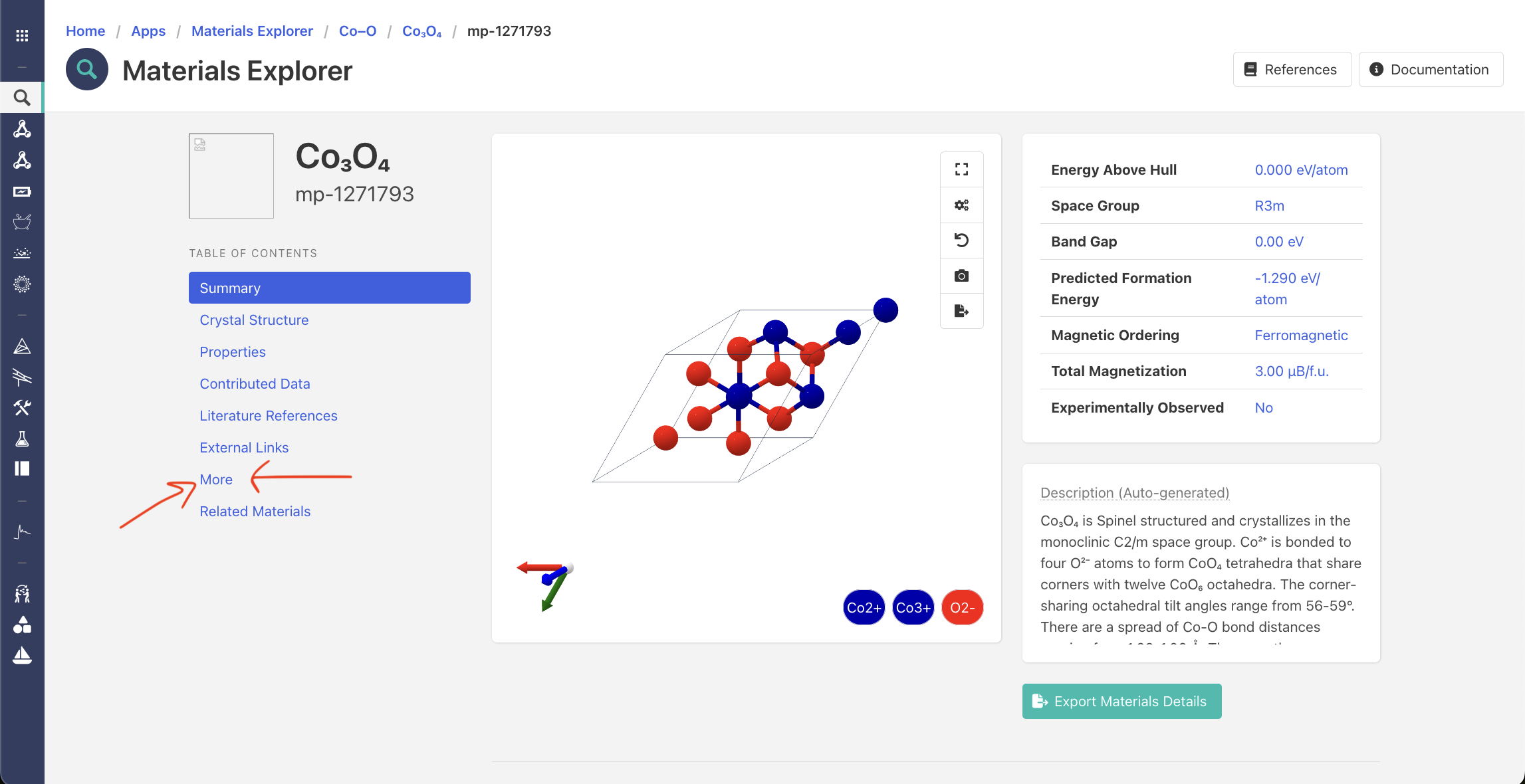
Provenance of Web structure

Hello, user everyone
I have some questions about using API.
The question content is a bit long, but I appreciate your understanding and would be grateful if you could answer just once.

Detail Qeustions:

  1. Is it correct that in the command mpr.get_structure_by_material_id(material_id = MPID, final = True), final = False represents the crystal structure provided by ICSD, while final = True represents the structure after VASP Relaxation?

  2. The web download structure seems to be conventional, and mpr.get_structure appears to be a primitive structure (before get_primitive). How can I obtain the structure provided by the website? While using the to_conventional() option might be a way, this method has the drawback of potentially damaging the crystal structure by spglib or being unable to use the MAGMOM data stored in the site properties.

  3. In the case of final = True, MAGMOM is stored in the site property column and printed together. Is this result the calculated magnetization, and does its order match the atomic order obtained through the structure?

  4. If the previous structure is converted to a primitive cell through get_primitive_structure(), can the order be considered properly maintained? While the visible order seems to match, I’m unsure if the order appropriately reflects properties like MAGMOM.

  5. Can Antiferromagnetic calculations be appropriately performed with the structure obtained from get_primitive_structure()? To my knowledge, Antiferromagnetic calculations are precisely calculated using the conventional structure.

  6. What were the inputs for calculating the band and various data on the website, and where can I view the outputs of these results? Is the data obtained through provenance_docs = mpr.materials.provenance.search(material_ids=[material_id]) correct?

- Code -

    for idx, structure_summary in enumerate(structures,1):
        try:
            # --- 1. 데이터 수집 ---
            material_id = structure_summary.material_id                 # MPID
(...)
             # --- 2. Get structure and preprocessing ---
            structure = mpr.get_structure_by_material_id(material_id, final=use_initial_structure)
            if isinstance(structure, list):
                structure = structure[0]
(...)
             primitive_cell = structure.get_primitive_structure()
(...)
            else:
                # 2) site_property mode: site_properties["magmom"] Used
                if "magmom" not in primitive_cell.site_properties:
                    # Warning if no site_property exist
                    msg = f"[{material_id}] ERROR: site_properties['magmom'] Not exist!"
                    print(msg)
                    mag_info_for_log = "ERROR: no site_properties['magmom']"

The symmetry error while using primitive cell
By obtaining the structure through get_primitive_structure(), the following errors often occur. The reason is probably that there is a problem with the structure conversion processed by spglib.
image

Most important question, what structures are the VASP calculation data provided by Materials Project based on?
The structures downloaded from the web seem to be provided based on conventional cell, but is there a way to see the structure actually used for writing material properties (band structure and magnetization, etc.) like the code where you could see the DOS structure?

Thanks for leading these long questions.
Best regards,
G. H.

Hi @Minju please don’t repost questions. Staff attention is limited and we’re not always able to answer longer questions immediately

  1. No - the ICSD structure was used for the first calculation, but the initial structure (final = False) may be from a previous relaxation

  2. The website / download uses spglib and to_conventional so there’s no “damage” happening. It’s the same methodology and data

  3. The site properties of a structure are in the same order as the sites themselves. The magnetic moments are taken from the final charge density

  4. spglib does not account for magnetic symmetry, only spatial symmetry. There are other tools you can use if you want to preserve the magnetic space group when reducing to a unit cell

  5. Different AFM configurations require different repeat units, typically supercells

  6. The provenance collection is up to date. You can retrieve tasks which were used to generate band structures and higher resolution DOSes by finding those with a task_type of NSCF_Line (bandstructure) or NSCF_Uniform (DOS). The inputs are included with those tasks, the task IDs are included in the electronic structure data, as explained in your other post

We do not provide support for VASP questions, you can contact the VASP team through their forum

First, I would like to apologize for reposting the same question.
Since it was a very old post where I left a comment, I thought it wouldn’t be visible.
My thinking was short-sighted. I am always grateful for the staff’s hard work.

2. The website / download uses spglib and `to_conventional`

Is the reference structure before to_conventional understood to be the same structure as downloaded from the API?

My primary concern right now is the origin of the download structure.
If the data obtainable through the API is the same as the web data, most of my current questions will actually be resolved. (If the results obtained by performing primitive cell calculations trusting the provided structure and MAGMOM data are identical to the results provided on the web, I can mention using Materials Project’s API and MPStaticSet in the paper.)

In final = False or final = True when performing to_conventional, which structure is the web data?
In the former case, it would be the structure before relaxation, and in the latter case, the structure after relaxation is complete.

And regarding VASP, I wasn’t inquiring about an error, but wanted to point out that using the get_primitive_cell() option tends to cause such errors more often. Converting the to_conventional() structure to a get_primitive_cell() structure can reduce such errors, but there is a problem of losing site properties.

Best regards,
G. H.

Not a problem and no worries. The website uses the API so the data is the same. The structures shown on the website, and obtained from the following API queries from our client will always be the relaxed structure:

from mp_api.client import MPRester

with MPRester() as mpr:
   summary = mpr.materials.summary.search(...)
   summary_structures = [doc.structure for doc in summary]
   structure = mpr.get_structure_by_material_id("mp-xx")

For static calculations, the structure obtained from

mpr.get_structure_by_material_id("mp-xx", final=False)

will be the same as with final=True (the default). However we only perform static / single-point calculations on structures after they have been relaxed in a separate calculation. For relaxation / geometry optimization calculations, the structures will differ depending on final

And regarding VASP, I wasn’t inquiring about an error, but wanted to point out

We have encountered similar problems with VASP. This can often be resolved by lowering the precision of the atomic coordinates, or increasing symprec:

structure.get_primitive_structure(symprec=0.1)

There’s a part I’m not understanding very well.

For static calculations, the structure obtained from final=False will be the same as with final=True (the default).

Why do final=False and final=True give same static structures? Doesn’t MPStaticSet generate only INCAR/KPOINTS data instead POSCAR structure? Structure loading only cares about relaxation (final), not calculation type, right?

Thanks for confirming the website uses API data.
So, the website likely converts the API structure to a standard format.
After conversion, atomic positions and cell parameters are very similar (differing from the 4th decimal place), but oxidation states differ.
For example, the website assigns Co2+ to 0.6291685 0.0 0.8835005, while the API assigns Co3+ to 0.6291255 0.0 0.8834999. This likely stems from BVAnalyzer prediction differences.

Therefore, how does the web calculate and add these oxidation states? Is there any good option to assign oxidation states to API POSCAR file same as website POSCAR?

mp-1271793, Website

Co12 O16
1.0
0.0000000000000000 10.2095112152377308 0.0000000000000000
5.8278732527041974 0.0000000000000000 0.0000000000000000
0.0000000000000000 -3.4065117970409271 -4.8655693483207072
Co O
12 16
direct
0.6291685000000000 0.0000000000000000 0.8835004999999990 Co2+
0.3708314999999990 0.0000000000000000 0.1164994999999990 Co2+
0.1291685000000000 0.5000000000000000 0.8835004999999990 Co2+
0.8708314999999991 0.5000000000000000 0.1164994999999990 Co2+
0.5000000000000000 0.5000000000000000 0.5000000000000000 Co3+
0.2500000000000000 0.7500000000000000 0.5000000000000000 Co3+
0.2500000000000000 0.2500000000000000 0.5000000000000000 Co3+
0.5000000000000000 0.5000000000000000 0.0000000000000000 Co3+
0.0000000000000000 0.0000000000000000 0.5000000000000000 Co3+
0.7500000000000000 0.2500000000000000 0.5000000000000000 Co3+
0.7500000000000000 0.7500000000000000 0.5000000000000000 Co3+
0.0000000000000000 0.0000000000000000 0.0000000000000000 Co3+
0.2647394999999990 0.5000000000000000 0.2802424999999990 O2-
0.0053544999999990 0.7732289999999991 0.2464394999999990 O2-
0.4946454999999990 0.2732289999999990 0.7535604999999991 O2-
0.4946454999999990 0.7267710000000001 0.7535604999999991 O2-
0.2665610000000000 0.5000000000000000 0.7520724999999990 O2-
0.0053544999999990 0.2267710000000000 0.2464394999999990 O2-
0.2352604999999990 0.0000000000000000 0.7197574999999991 O2-
0.2334389999999990 0.0000000000000000 0.2479275000000000 O2-
0.7647394999999990 0.0000000000000000 0.2802424999999990 O2-
0.5053544999999990 0.2732289999999990 0.2464394999999990 O2-
0.9946455000000001 0.7732289999999991 0.7535604999999991 O2-
0.9946455000000001 0.2267710000000000 0.7535604999999991 O2-
0.7665609999999990 0.0000000000000000 0.7520724999999990 O2-
0.5053544999999990 0.7267710000000001 0.2464394999999990 O2-
0.7352605000000001 0.5000000000000000 0.7197574999999991 O2-
0.7334389999999991 0.5000000000000000 0.2479275000000000 O2-

mp-1271793, API to conventional

Co12 O16
1.0
0.0000000000000000 10.2095112152377308 0.0000000000000000
5.8278732527041974 0.0000000000000000 0.0000000000000000
0.0000000000000000 -3.4065117970409271 -4.8655693483207072
Co O
12 16
direct
0.5000000000000000 0.5000000000000000 0.5000000000000000 Co2+
0.5000000000000000 0.5000000000000000 0.0000000000000000 Co2+
0.0000000000000000 0.0000000000000000 0.5000000000000000 Co2+
0.0000000000000000 0.0000000000000000 0.0000000000000000 Co2+
0.2500000000000000 0.7500000000000000 0.5000000000000000 Co3+
0.2500000000000000 0.2500000000000000 0.5000000000000000 Co3+
0.6291254999999998 0.0000000000000000 0.8834999999999994 Co3+
0.3708745000000002 0.0000000000000000 0.1165000000000006 Co3+
0.7500000000000000 0.2500000000000000 0.5000000000000000 Co3+
0.7500000000000000 0.7500000000000000 0.5000000000000000 Co3+
0.1291254999999998 0.5000000000000000 0.8834999999999994 Co3+
0.8708745000000002 0.5000000000000000 0.1165000000000006 Co3+
0.2646964999999994 0.5000000000000000 0.2802419999999995 O2-
0.0053114999999990 0.7731864999999999 0.2464390000000006 O2-
0.4946885000000010 0.2731864999999999 0.7535609999999994 O2-
0.4946885000000010 0.7268135000000001 0.7535609999999994 O2-
0.2665179999999998 0.5000000000000000 0.7520719999999994 O2-
0.0053114999999990 0.2268135000000001 0.2464390000000006 O2-
0.2353035000000006 0.0000000000000000 0.7197580000000005 O2-
0.2334820000000002 0.0000000000000000 0.2479280000000006 O2-
0.7646964999999994 0.0000000000000000 0.2802419999999995 O2-
0.5053114999999990 0.2731864999999999 0.2464390000000006 O2-
0.9946885000000010 0.7731865000000000 0.7535609999999994 O2-
0.9946885000000010 0.2268135000000001 0.7535609999999994 O2-
0.7665179999999998 0.0000000000000000 0.7520719999999994 O2-
0.5053114999999990 0.7268135000000000 0.2464390000000006 O2-
0.7353035000000006 0.5000000000000000 0.7197580000000005 O2-
0.7334820000000002 0.5000000000000000 0.2479280000000006 O2-

And, I’m sorry for asking the same thing multiple times, but ultimately, the source of the structure provided on the website is, as long as I look at the structure from the task ID found through the provenance command, that’s correct, right?

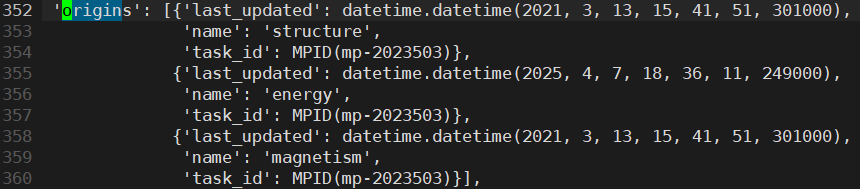
352 ‘origins’: [{‘last_updated’: datetime.datetime(2021, 3, 13, 15, 41, 51, 301000),
353 ‘name’: ‘structure’,
354 ‘task_id’: MPID(mp-2023503)},
355 {‘last_updated’: datetime.datetime(2025, 4, 7, 18, 36, 11, 249000),
356 ‘name’: ‘energy’,
357 ‘task_id’: MPID(mp-2023503)},
358 {‘last_updated’: datetime.datetime(2021, 3, 13, 15, 41, 51, 301000),
359 ‘name’: ‘magnetism’,
360 ‘task_id’: MPID(mp-2023503)}],
361 ‘possible_species’: [‘Ge2-’, ‘Co2+’],
Taking the file above as an example, mp-2023503, which was uploaded in 2021, is the API structure data.
Besides the data above, there’s also data listing various task IDs called task_ids, but this seems like just a record, right? There’s no detailed explanation for these IDs.
I’m wondering how I can obtain the exact same input (POSCAR, INCAR, KPOINTS, etc.) as what’s being provided on the web.

task_ids

390 ‘task_ids’: [MPID(mp-2669134),
391 MPID(mp-1079777),
392 MPID(mp-2655729),
393 MPID(mp-2374040),
394 MPID(mp-1300353),
395 MPID(mp-2655700),
396 MPID(mp-1671314),
397 MPID(mp-2669113),
398 MPID(mp-2669285),
399 MPID(mp-2319277),
400 MPID(mp-1591716),
401 MPID(mp-2023503),
402 MPID(mp-2026906),
403 MPID(mp-2193111),
404 MPID(mp-2669299),
405 MPID(mp-21237),
406 MPID(mp-2669334),
407 MPID(mp-2707284),
408 MPID(mp-2655926),
409 MPID(mp-1524447),
410 MPID(mp-2707280),
411 MPID(mp-2655900),
412 MPID(mp-1921025),
413 MPID(mp-2655734),
414 MPID(mp-2669227),
415 MPID(mp-2655862),
416 MPID(mp-2669385),
417 MPID(mp-2669411),
418 MPID(mp-2707293),
419 MPID(mp-2669388),
420 MPID(mp-2669282),
421 MPID(mp-2669361)],

Please let me know if there is any documentation on viewing data related to a specific task_id, or documentation on how to read provenance data.

Finally, I sincerely appreciate your help as always. Your assistance is a great help to my immature research.

Why do final=False and final=True give same static structures? Doesn’t MPStaticSet generate only INCAR/KPOINTS data instead POSCAR structure? Structure loading only cares about relaxation (final), not calculation type, right?

When you retrieve structures from the database, they are always structures coming from a DFT calculation. Thus final = True would correspond to the CONTCAR, and final = False to the POSCAR

We often do static calculations, using e.g., MPStaticSet (which takes in a structure and generates INCAR, KPOINTS, POSCAR, and POTCAR files from write_input), where the geometry is not updated. Then POSCAR and CONTCAR are the same

So, the website likely converts the API structure to a standard format.

Again, no. The data on the website is the same as from the API. There is no conversion happening unless you request a conventional, primitive, or supercell in the interactive crystal structure plot

Therefore, how does the web calculate and add these oxidation states? Is there any good option to assign oxidation states to API POSCAR file same as website POSCAR?

The website does not calculate anything unless you request it. The method we use for assigning oxidation states is here

The discrepancy you see is from running `to_conventional`. Running `to_conventional` with the "Website" POSCAR you sent gives exactly the same structure:

Co12 O16
1.0
0.0000000000000000 10.2095112152377290 0.0000000000000000
5.8278732527041974 0.0000000000000000 0.0000000000000000
0.0000000000000000 -3.4065117970409271 -4.8655693483207072
Co O
12 16
direct
0.0000000000000000 0.0000000000000000 0.5000000000000000 Co2+
0.0000000000000000 0.0000000000000000 0.0000000000000000 Co2+
0.5000000000000000 0.5000000000000000 0.5000000000000000 Co2+
0.5000000000000000 0.5000000000000000 0.0000000000000000 Co2+
0.8708315000000002 0.5000000000000000 0.1164995000000010 Co3+
0.1291684999999998 0.5000000000000000 0.8835004999999990 Co3+
0.7500000000000000 0.2500000000000000 0.5000000000000000 Co3+
0.7500000000000000 0.7500000000000000 0.5000000000000000 Co3+
0.3708315000000002 0.0000000000000000 0.1164995000000010 Co3+
0.6291684999999998 0.0000000000000000 0.8835004999999990 Co3+
0.2500000000000000 0.7500000000000000 0.5000000000000000 Co3+
0.2500000000000000 0.2500000000000000 0.5000000000000000 Co3+
0.2352605000000012 0.0000000000000000 0.7197575000000009 O2-
0.9946455000000011 0.2267710000000009 0.7535605000000010 O2-
0.0053544999999989 0.2267710000000009 0.2464394999999990 O2-
0.0053544999999989 0.7732289999999991 0.2464394999999990 O2-
0.7334390000000006 0.5000000000000000 0.2479275000000010 O2-
0.9946455000000011 0.7732289999999991 0.7535605000000010 O2-
0.7647394999999988 0.0000000000000000 0.2802424999999991 O2-
0.2665609999999994 0.5000000000000000 0.7520724999999990 O2-
0.7352605000000012 0.5000000000000000 0.7197575000000009 O2-
0.4946455000000011 0.7267710000000009 0.7535605000000010 O2-
0.5053544999999988 0.7267710000000009 0.2464394999999990 O2-
0.5053544999999988 0.2732289999999991 0.2464394999999990 O2-
0.2334390000000006 0.0000000000000000 0.2479275000000010 O2-
0.4946455000000011 0.2732289999999991 0.7535605000000010 O2-
0.2647394999999988 0.5000000000000000 0.2802424999999991 O2-
0.7665609999999994 0.0000000000000000 0.7520724999999990 O2-

as long as I look at the structure from the task ID found through the provenance command, that’s correct, right?

There are no task IDs in the provenance endpoint. You need to do something like this:

summary = MPRester().materials.summary.search(material_ids=["mp-1271793"],fields=["origins"])
structure_task = [prop for prop in summary[0].origins if prop.name == "structure"][0]
print(structure_task.task_id)

Please let me know if there is any documentation on viewing data related to a specific task_id, or documentation on how to read provenance data.

You can use the API client and search the materials.tasks endpoint, or you can see them on the website by going to the Calculations tab (More → Calculations)

I think I keep misunderstanding something.
You mentioned that the data downloadable from the website (in my case, POSCAR from VASP) and the structure obtainable through the API are the same, unless they undergo conversions such as get_primitive_structure() or to_conventional().

However, please just verify the following one more time.
For CoGe mp-21237 material,

Full Summary (obtained by `pprint(summary_doc.model_dump(), stream=file)`)

‘structure’: Structure Summary
Lattice
abc : 3.7103330822306 4.872010580197322 6.1017927907022775
angles : 99.0422905942877 107.70019291902739 89.99998955930387
volume : 103.63940110076324
A : 3.52674352 0.0 -1.15267156
B : -0.27217499 4.79259059 -0.83275645
C : 0.04230065 0.08763934 6.10101674
pbc : True True True
PeriodicSite: Co (0.0, 0.0, 0.0) [-0.0, 0.0, 0.0]
PeriodicSite: Co (-0.1361, 2.396, -0.4164) [-0.0, 0.5, 0.0]
PeriodicSite: Co (2.679, 3.286, 2.226) [0.8044, 0.6746, 0.6089]
PeriodicSite: Co (0.6176, 1.594, 1.89) [0.1956, 0.3254, 0.3911]
PeriodicSite: Ge (2.856, 0.9262, 2.768) [0.8163, 0.1817, 0.6327]
PeriodicSite: Ge (0.4406, 3.954, 1.348) [0.1837, 0.8183, 0.3673]
PeriodicSite: Ge (1.939, 1.366, -0.03986) [0.5698, 0.2824, 0.1397]
PeriodicSite: Ge (1.358, 3.515, 4.155) [0.4302, 0.7176, 0.8603],

POSCAR (from web)

Co8 Ge8
1.0
0.0000000000000000 11.6258734236937862 0.0000000000000000
3.7103330822306000 0.0000000000000000 0.0000000000000000
0.0000000000000000 -0.8037508972095720 -4.8052545810590983
Co Ge
8 8
direct
0.0000000000000000 0.0000000000000000 0.0000000000000000 Co2+
0.0000000000000000 0.0000000000000000 0.5000000000000000 Co2+
0.6955530150000000 0.5000000000000000 0.3254445099999990 Co2+
0.8044469850000000 0.0000000000000000 0.6745554900000000 Co2+
0.5000000000000000 0.5000000000000000 0.0000000000000000 Co2+
0.5000000000000000 0.5000000000000000 0.5000000000000000 Co2+
0.1955530150000000 0.0000000000000000 0.3254445099999990 Co2+
0.3044469850000000 0.5000000000000000 0.6745554900000000 Co2+
0.6836654950000001 0.5000000000000000 0.8183049300000000 Ge2-
0.8163345050000000 0.0000000000000000 0.1816950699999990 Ge2-
0.9301625600000001 0.5000000000000000 0.7175894500000001 Ge2-
0.5698374399999990 0.0000000000000000 0.2824105499999990 Ge2-
0.1836654949999990 0.0000000000000000 0.8183049300000000 Ge2-
0.3163345050000000 0.5000000000000000 0.1816950699999990 Ge2-
0.4301625600000000 0.0000000000000000 0.7175894500000001 Ge2-
0.0698374399999990 0.5000000000000000 0.2824105499999990 Ge2-

These two are definitely different. The data provided in the Summary is a unit cell structure (even if it’s not a primitive cell), whereas the Web data currently represents a conventional cell structure.

This is why I kept asking if the API data is being stored as conventional data on the Web.

Also, strangely, unless I request get_primitive_cell(), the site property MAGMOM (calculated CHGCAR data) isn’t added to the INCAR options, and it seems MAGMOM is written as blank. Could this also be due to the structural transformation?

Regarding the above part, it seems we extracted the data with the same functionality. Of course, I didn’t know how, so I pulled all the data. :sweat:
Thanks for the advice.
pprint(summary_doc.model_dump(), stream=file)

>  'origins': [{'last_updated': datetime.datetime(2021, 3, 13, 15, 41, 51, 301000),
>               'name': 'structure',
>               'task_id': MPID(mp-2023503)},
>              {'last_updated': datetime.datetime(2025, 4, 7, 18, 36, 11, 249000),
>               'name': 'energy',
>               'task_id': MPID(mp-2023503)},
>              {'last_updated': datetime.datetime(2021, 3, 13, 15, 41, 51, 301000),
>               'name': 'magnetism',
>               'task_id': MPID(mp-2023503)}],

The website uses the API and the mp_api client to retrieve data. However, skimming through the web code, the structure is retrieved from the API and then to_conventional is called on the structure. That’s why the interactive crystal diagram gives you the conventional cell on download

My apologies for the confusion there. I would recommend using the mp_api client directly to retrieve data if you want more control over the structure you get back from the API

The data provided in the Summary is a unit cell structure (even if it’s not a primitive cell), whereas the Web data currently represents a conventional cell structure.

Just be careful: currently, the data from summary is not always a unit or primitive unit cell. However the website defaults to downloading the conventional cell

Also, strangely, unless I request get_primitive_cell(), the site property MAGMOM (calculated CHGCAR data) isn’t added to the INCAR options

Running this gives me a MAGMOM tag that agrees with the structure. BTW the magnetic moments are taken from OUTCAR / vasprun.xml, not directly from CHGCAR

from pymatgen.io.vasp.sets import MPStaticSet

structure = mpr.get_structure_by_material_id("mp-1271793")
vis = MPStaticSet(
    structure = structure
)
print(vis.incar.get("MAGMOM"))
>>> [0.101, 0.108, 0.107, 2.6390000000000002, 2.6390000000000002, 0.089, 0.019, 0.019, 0.019, 0.019, 0.018000000000000002, 0.019, 0.019, 0.018000000000000002]

print(
    all(
        abs(vis.incar["MAGMOM"][idx] - magmom) < 1e-6
        for idx, magmom in enumerate(structure.site_properties.get("magmom",[]))
    )
)
>>> True

Ah! Now it’s clear.
The API data stored on the server is all the same structure (which may not be primitive), but the structures provided on the web are converted to conventional cells.
Then, all calculations can likely be done with the primitive cell, as it matches structurally with the conventional one.
For AFM materials, each requires a distinct cell, necessitating structurally identical designs and modulation of MAGMOM; thus, finding the lowest energy structure is essential.

  • Regarding .get_structure via API, if task_id calculation is r2SCAN, is the downloaded structure also r2SCAN-calculated? I need a GGA (GGA+U) relaxed (final=True) structure for my GGA calculation. Using r2SCAN-optimized structures directly for static GGA calculations without relaxation is computationally inappropriate (advisor agrees).

  • How can I load structure information from a GGA calculation?
    I know how to obtain thermo data (entry energy, energy above hull, etc.) as shown below, but I’m unsure how to sort and search for the corresponding structures.

mpr.materials_thermo_search(material_ids=LIST_OF_RELEVANT_MPIDS, 
                                       thermo_types=["GGA_GGA+U"])

My search conditions are as follows. In the environment below, what is the best way to complete the sorting based on the GGA data results and obtain suitable structure information?

MPRester
with MPRester(API_KEY) as mpr, open("structure.txt","w") as file:
    # --- Materials Project  search qualification ---
    structures = mpr.materials.summary.search(
        elements=["Co"],
        chemsys="Co-*",
        energy_above_hull=(0, 0.02),
        num_sites=(0, 20),
        is_metal=True,
    )
  • The task ID data is extensive. How can I organize and view it? The outputted data repeats, task_type is always Structure Optimization, and the input and output seems no changes.
task_id data extraction
from mp_api.client import MPRester
API_KEY = "~"
try:
    with MPRester(API_KEY) as mpr:

        task_doc = mpr.materials.tasks.search(task_ids=["mp-2023503"])[0]

        for attr_name in dir(task_doc):)
            if not attr_name.startswith("__"):
                attr_value = getattr(task_doc, attr_name)
                print(f"{attr_name}: {attr_value}")
  • I can’t find the calculation tab on the web. Where is “More” tab?

Once I get the answers to the above questions, it seems like almost everything will be resolved. Thank you.

Regarding .get_structure via API, if task_id calculation is r2SCAN, is the downloaded structure also r2SCAN-calculated?

Yes it would have been relaxed with r2SCAN. You can see the other tasks associated with a material from the API client like this:

mat_doc = MPRester().materials.search(material_ids=["mp-1271793"])[0]
print(mat_doc.calc_types)

Or again on the website by going to the More --> Calculations tabs:


If you don’t see a GGA Structure Optimization calculation listed there, you’ll have to perform your own. See this answer for a bit more information

You will often see tasks of the same calc_type because we often repeat calculations to ensure higher-quality calculations

According to this, it seems I can retrieve a structure based on its run_type.

When retrieving a structure by its run_type, if a material has multiple tasks of the same type (e.g., GGA Structure Optimization), which structure is selected? I’m wondering if the first code snippet in the linked post (the alternative code specifies the task ID directly) retrieves the result from the most recent structure optimization in a chronologically ordered list of tasks.

First, the task IDs I’ve extracted are listed below. Can I understand that the order of the task IDs represents the chronological order of the calculations? (The list order is same as summary data’s task_ids)

task_details = mpr.materials.tasks.search(
    task_ids=task_id_list,
    fields=["task_id", "calc_type"]
)

>> OUTPUT <<
Material ID: mp-21237
Full Formula: Co4Ge4
  - Task ID: mp-2669134, Type: GGA Deformation
  - Task ID: mp-1079777, Type: GGA Structure Optimization
  - Task ID: mp-2655729, Type: GGA Deformation
  - Task ID: mp-2374040, Type: GGA Deformation
  - Task ID: mp-1300353, Type: GGA Static
  - Task ID: mp-2655700, Type: GGA Deformation
  - Task ID: mp-1671314, Type: GGA NSCF Uniform
  - Task ID: mp-2669113, Type: GGA Deformation
  - Task ID: mp-2669285, Type: GGA Deformation
  - Task ID: mp-2319277, Type: GGA NSCF Line 
  - Task ID: mp-1591716, Type: GGA NSCF Line 
  - Task ID: mp-2023503, Type: r2SCAN Structure Optimization
  - Task ID: mp-2026906, Type: PBEsol Structure Optimization
  - Task ID: mp-2193111, Type: GGA NSCF Line 
  - Task ID: mp-2669299, Type: GGA Deformation
  - Task ID: mp-21237, Type: GGA Structure Optimization
  - Task ID: mp-2669334, Type: GGA Deformation
  - Task ID: mp-2707284, Type: GGA Deformation
  - Task ID: mp-2655926, Type: GGA Deformation
  - Task ID: mp-1524447, Type: SCAN Structure Optimization
  - Task ID: mp-2707280, Type: GGA Deformation
  - Task ID: mp-2655900, Type: GGA Deformation
  - Task ID: mp-1921025, Type: GGA Static
  - Task ID: mp-2655734, Type: GGA Structure Optimization
  - Task ID: mp-2669227, Type: GGA Deformation
  - Task ID: mp-2655862, Type: GGA Deformation
  - Task ID: mp-2669385, Type: GGA Deformation
  - Task ID: mp-2669411, Type: GGA Deformation
  - Task ID: mp-2707293, Type: GGA Deformation
  - Task ID: mp-2669388, Type: GGA Deformation
  - Task ID: mp-2669282, Type: GGA Deformation
  - Task ID: mp-2669361, Type: GGA Deformation

So, does this mean that if I want to retrieve a GGA, GGA+U structure via the API to perform a calculation, I should list up all task ids and have to look around which is the up to date calculation? Also, have to see in detail of each task id and extract their output structure myself.

Second question: looking at the task IDs, it appears that for each material, the r2SCAN calculation is only performed once that structure optimization and no other. In that case, are the band structure and density of states provided on the website, as well as the data retrieved via the API (like mpr.get_dos_by_material_id ), based on the GGA calculation results?

I need to confirm the following:

  • The source of cohesive energy calculation (and whether +U correction was applied, magnetism was considered, etc.).
  • The source of the calculation that determined the magnetic order (which requires calculations while varying MAGMOM).

Sincery,
G. H.

I should list up all task ids and have to look around which is the up to date calculation?

  1. you can include the origins field when querying the materials endpoint to get the task_id for the blessed structure of a material.
  2. if you do want to see how “up-to-date” a task is, the task documents have last_updated and completed_at fields.

Second question: looking at the task IDs, it appears that for each material, the r2SCAN calculation is only performed once that structure optimization and no other.

depends on the material, some materials have multiple r2SCAN calculations, some have none.

In that case, are the band structure and density of states provided on the website, as well as the data retrieved via the API (like mpr.get_dos_by_material_id ), based on the GGA calculation results?

The origins field of the electronic structure endpoint will give you some info on the calculation provenance.
Last I checked all the bandstructures were GGA calculations, but we should have DOS from r2SCAN calculations.

The source of the calculation that determined the magnetic order (which requires calculations while varying MAGMOM).

The magnetism endpoint also has an origins field.

As an aside, since you are asking for the origins of many different properties, the summary endpoint aggregates all the property origins for each material.

Thanks to read and answer my question @tsmathis.

  1. I’m aware about the data extracted from origins field shows up-to-date task_id about three factors: structure, energy magnetization.
    What I wonder was, when I want to specifically extract GGA and GGA+U structures, how do I know which optimization is the most recent, and is the only way to retrieve that structure to search for the task_id one by one?

  2. Coincidentally, I was also wondering about the last_updated and completed_at fields.
    In a task, some last_updated entries are updated to about a day ago, while other data has a much older date. What is the difference between them?
    It seems that completed_at is the more accurate date.
    r2SCAN_task_mp-2023503.txt (63.4 KB)
    in that file, you can see that last_updated is split into two days: 2025-09-21 and 2021-03-13.
    The completed_at date is 2020-11-04.

The origin (from structure summary) has only 3 items: structure, energy, and magnetism.
There is missing electronic properties, DOS and band structure, so can you please tell me where was GGA for those calculations confirmed?
I also switching into electronic_structure and returns no output about origins.
This seems my data pulling mechanism is wrong. (I’m now trying to find how to use this endpoint…)

Also, what do you mean by “we should have DOS from r2SCAN calculations”?
Do yoou mean the band structure needs to be updated later using results obtained from r2SCAN?

I’m unable to find information about the initial structure and calculations used to determine the magnetic order for magnetization.
For example, when I extract summary data using the code below, the origin for the Co4Ge4 (mp-21237) material is listed as task_id: mp-2023503, which is the task_id for an r2SCAN optimization.
Based on this link Magnetic Ordering Search - Materials Project - Materials Science Community Discourse, I understand that initial magnetism calculations are traditionally performed assuming a ferromagnetic (FM) state. Is it still not possible to determine whether a specific material has undergone a MAGMOM sweep to properly find its magnetic order?

In any case, considering the points mentioned above, is it correct to say that the magnetic order provided by MP is not accurate, and therefore, high-throughput screening based on it will ultimately generate unreliable data for magnetic materials?

Detail_magnetism_summary.py

import traceback
from mp_api.client import MPRester
from pprint import pprint

Basic configuration

API_KEY = “” # Insert your Materials Project API key here

Data selection option

SHOW_FULL_MAGNETISM_DATA = True

def main():
output_filename = “detail_magnetism_summary.txt”

with MPRester(API_KEY) as mpr, open(output_filename, "w", encoding="utf-8") as file:
    print("Starting Materials Project data query...")

    # Step 1: Query materials and keep the returned order
    print("1/2: Searching for materials to fix the order...")
    structures_summary = mpr.materials.summary.search(
        elements=["Co"],
        chemsys="Co-*",
        energy_above_hull=(0, 0.02),
        num_sites=(0, 20),
        is_metal=True,
        fields=["material_id", "formula_pretty", "composition"],
    )

    if not structures_summary:
        print("No materials found.")
        file.write("No materials found.\n")
        return

    material_ids_to_query = [doc.material_id for doc in structures_summary]
    print(f" -> Found {len(material_ids_to_query)} materials. Keeping this order.")

    # Step 2: Retrieve magnetism data for all collected IDs
    print("2/2: Retrieving magnetism data for the collected IDs...")
    magnetism_data_list = mpr.materials.magnetism.search(
        material_ids=material_ids_to_query
    )

    # Create a lookup map from material_id to magnetism doc
    magnetism_data_map = {doc.material_id: doc for doc in magnetism_data_list}
    print(" -> Magnetism data lookup map created.\n")

    total_materials = len(structures_summary)
    file.write(
        f"Summary of magnetism data for {total_materials} materials (order preserved)\n"
        + "=" * 50
        + "\n\n"
    )

    # Iterate using the ordered summary list
    for idx, summary_doc in enumerate(structures_summary, 1):
        material_id = summary_doc.material_id
        pretty_formula = summary_doc.formula_pretty
        full_formula = summary_doc.composition.formula.replace(" ", "")
        print(f"[{idx}/{total_materials}] Processing: {full_formula} ({material_id})")

        try:
            file.write(f"--- {idx}. {full_formula} ({material_id}) ---\n")

            magnetism_doc = magnetism_data_map.get(material_id)

            if SHOW_FULL_MAGNETISM_DATA and magnetism_doc:
                file.write("\n[Full Magnetism Summary Data]\n")
                pprint(magnetism_doc.model_dump(), stream=file)
            elif not magnetism_doc:
                file.write("\n  - Corresponding magnetism data not found for this material.\n")

            file.write("\n" + "-" * 40 + "\n\n")

        except Exception as e:
            error_msg = f"Error occurred: {e}\n{traceback.format_exc()}"
            print(f"  - (Error) Problem processing {full_formula} ({material_id}). Check log file.")
            file.write(f"\n[ERROR]\n{error_msg}\n\n" + "-" * 40 + "\n\n")

print(f"\nAll done. Results saved to '{output_filename}'.")

if name == “main”:
main()

I apologize for the continued questions.
There is a lot to check when performing calculations using the Materials Project, and there is still much I do not know.
Thank you to everyone who always provides answers.

how do I know which optimization is the most recent, and is the only way to retrieve that structure to search for the task_id one by one?

Task ids globally increment over time, so a larger task id generally means a newer calculation. But to be absolutely certain, yes, you would need to check the tasks endpoint and sort your results on last_updated

I was also wondering about the last_updated and completed_at fields. …
What is the difference between them?

As the names imply, completed_at → when the calculation was first completed, last_updated → when the document was last updated.

There is missing electronic properties, DOS and band structure, so can you please tell me where was GGA for those calculations confirmed?

Not every material has every property available.

Do yoou mean the band structure needs to be updated later using results obtained from r2SCAN?

MP has not generated any bandstructures using r2SCAN workflows yet.

In any case, considering the points mentioned above, is it correct to say that the magnetic order provided by MP is not accurate …

I’m not sure what would make you believe this? The information in the thread you linked is still accurate. Most of your questions seem to be answered already in that thread.

Literally, what I meant was that a result calculated from an FM initialized structure can get trapped in a local minimum, regardless of whether the final state is NM or FM or AFM.
In practice, to perform an accurate magnetic calculation, isn’t it necessary to find the structure with the lowest energy among various calculations by modifying the initial MAGMOM (site magnetization) values multiple times? (This process requires testing by changing the alignment of the magnetic moments to AFM, FM, etc.)
In particular, for magnetic calculations, is there still no way to know how a calculation was completed? For example, whether it was calculated with an FM initialization, or by varying the magnetic moments like the ~5,000 calculations performed as of 2020, as mentioned in a previous thread?
This is the part I’m referring to.

Regarding this part, what I meant was not simply that a specific property is unavailable, but rather that I likely failed to get the correct results because I specified the search options incorrectly.
I thought there were probably more output options available besides ‘materials summary,’ such as ‘materials electronic structure,’ ‘materials magnetism,’ etc., and that data not shown in the summary could be obtained from them.
Even after referring to the provided link, I couldn’t figure out how to specify an endpoint to retrieve the data I want.
Therefore, I would be grateful if you could recommend a thread with helpful examples. When I searched, I couldn’t find any examples on how to extract data from those two documents.

Literally, what I meant was that a result calculated from an FM initialized structure can get trapped in a local minimum, regardless of whether the final state is NM or FM or AFM.
In practice, to perform an accurate magnetic calculation, isn’t it necessary to find the structure with the lowest energy among various calculations by modifying the initial MAGMOM (site magnetization) values multiple times?

We do not do this for every material - unless a magnetic ordering calc was performed, an initial ferromagnetic order is used. If you need a specific magnetic config, use our workflows to do so

In particular, for magnetic calculations, is there still no way to know how a calculation was completed?

The task collection contains this information

Therefore, I would be grateful if you could recommend a thread with helpful examples. When I searched, I couldn’t find any examples on how to extract data from those two documents.

We have our own documentation and you can look through the API documentation to understand what endpoints and properties there are. Our client code is also public and shows the API endpoints clearly