Some problem with Materials Project version

Hello everyone,

I’m writing this post to ask a simple question as I’ve encountered an issue while working on my paper.

First, I’m currently using mp-api version 0.42.1.
With this version, I’ve completed the entire process of sorting existing data (with desired conditions such as band gap, hull E, etc.) and creating inputs for the necessary materials.

However, it seems the version has been updated, and the number of materials displayed on the Materials Project website differs from the number of materials I extracted at that time (I believe I extracted them about a year ago).

For my paper, I need to document the number of materials at each sorting stage, but I’m facing an issue where I cannot see the intermediate stages because the material count has changed.

My initial solution was to extract materials at each stage using mp-api version 0.42.1, but the existing code doesn’t work due to version differences.

If you have any good solutions, I would appreciate your response.

Hi @Minju ,

was away for a few days so I couldn’t reply right away, hopefully this still helps

As long you know roughly when you began your research you should be able to find the correct version of each collection you need from AWS: MP build bucket explorer (collections sub-directory)

To get more accurate than just the YYYY-MM-DD time stamps in the explorer you can also cross-reference the database change log for the dates + approximate times each version went live: MP Database Version change log

Since you mention that your workflow originated about a year ago, the following will apply to the <version>/<collection_name> versions you see in the explorer. Using the April 2025 summary collection as a concrete example:

For all of the below you’ll likely want to additionally filter on deprecated == False since the mp-api client by default excludes deprecated materials.

Step 0: Check if the manifest file has the filter fields you need:

>>> import pandas as pd
>>> df = pd.read_json("s3://materialsproject-build/collections/2025-04-10/summary/manifest.jsonl.gz", lines=True, compression="gzip", storage_options={"anon": True})
>>> df.columns
Index(['theoretical', 'formation_energy_per_atom', 'deprecated', 'material_id',
       'formula_pretty', 'nelements', 'last_updated', 'band_gap',
       'energy_above_hull', 'e_total', 'density', 'e_electronic', 'task_ids',
       'total_magnetization', 'symmetry_number', 'sourced_from_path'],
      dtype='object')

If you just need band_gap and energy_above_hull that might be enough and you can skip the remaining steps. You can repeat this with the other collections as needed (electronic_structure, thermo, etc.)

Step 1: Just pull the whole collection via the AWS cli: aws s3 --no-sign-request sync s3://materialsproject-build/collections/2025-04-10/summary/ summary/

Step 2: Filter:

if you have a decent amount of memory and don’t want to think about it, materialize everything in one go:

import gzip
import json
import os
from itertools import chain

import pandas as pd

docs = []
for root, dirs, files in os.walk("summary"):
    for file in files:
        if "manifest" not in file:
            with gzip.open(os.path.join(root, file), "rb") as f:
                docs.append(
                    [json.loads(line) for line in f.read().splitlines()],
                )

docs = list(chain.from_iterable(docs))

df = pd.DataFrame(docs)

# filter via pandas ...

Or if you’re resource constrained just pipeline your way through:

import gzip
import json
import operator
import os
from functools import reduce


def read_docs(dir_path):
    for root, dirs, files in os.walk(dir_path):
        for file in files:
            if "manifest" not in file:
                with gzip.open(os.path.join(root, file), "rb") as f:
                    for line in f.read().splitlines():
                        yield json.loads(line)


# some vals are nullable
def safe_filter(docs, field, operator, target_val):
    for doc in docs:
        if doc[field] is not None and operator(doc[field], target_val):
            yield 1
            # or do something useful and yield the actual entry, ;shrug;
            # yield doc


docs = read_docs("summary")
e_above_hull_gt_5_meV = reduce(
    operator.add,
    safe_filter(docs, "energy_above_hull", operator.gt, 0.005),
    0,
)

print(f"Entries above hull by 5 meV/atom: {e_above_hull_gt_5_meV}")
# -> "Entries above hull by 5 meV/atom: 114914"

^All this only applies to the jsonl datasets

edit: Additionally, in your paper it would be good to mention which db version your data is from for reproducibility for readers :slight_smile:


This is mostly FYI/general info: And as you said, with the latest version (v2026.04.13) the storage format (and by necessity some of the schemas) have changed. Prior to v2026.04.13 all the collections were stored in the JSON Lines (jsonl) format, going forward everything will be available as parquet datasets as the parquet format is more performant in the context in which MP delivers/uses large datasets.

In the course of the parquet change, the partitioning of the collections have been inverted as well. So the jsonl datasets were <version>/<collection_name>, the parquet datasets are now <collection_name>/.

Eventually all the old db versions will be migrated to the parquet format and be backfilled into the existing parquet datasets.

Which will enable stuff like the following (disclaimer: only works for version 2026-04-13):

import pyarrow.compute as pc
import pyarrow.dataset as ds
import pyarrow.fs as fs

anon_s3_fs = fs.S3FileSystem(anonymous=True, region="us-east-1")

summary_dataset = ds.dataset(
    "materialsproject-build/collections/summary/",
    partitioning="hive",
    filesystem=anon_s3_fs,
)

# sub in "2026-04-13" for version for this to use the latest version
# and actually work
expr = (pc.field("version") == "2025-04-10") & (pc.field("energy_above_hull") > 0.005)

e_above_hull_gt_5_meV = summary_dataset.count_rows(filter=expr)

Which is much more ergonomic (and performant) than the jsonl stuff. Passing the version to the mp-api client is also on the roadmap for integration once we backfill the parquet versions of the previous versions.

Hello tsmathis,

First of all, thank you for leaving such a detailed answer.

One unfortunate thing is that I’m a complete novice in this area, so even though you explained things in such detail, it’s still a bit hard for me to understand.
(How to do it through AWS, what a manifest file is, etc… I’ll gradually look these up using an LLM.)

From what I understand, the structure seems to be:

  1. Search for the previous version through the Version explorer
  2. Download the JSON file for that version
  3. Sort within the file
    Is this correct?

If I follow what you said, will I be able to check the data for that version?
What I want to check is the change in the number of metal compounds classified according to E_hull and N_atom, etc., in that particular version.
The number of materials I can currently check and the number in my research data are quite different.

Also, you mentioned that in the newly changed parquet dataset, the version entries disappear and it gets migrated from the existing one—
in this case, is it no longer possible to distinguish differences by version in the parquet dataset?
For example, if there were a total of 10,000 metal compounds in version 1.0, but this decreased to 8,000 in version 2.0, I’m asking whether this difference can be checked.

First, I previously downloaded the desired property data directly in cif format using the method below.

with MPRester(API_KEY) as mpr, open("structure.txt","w") as file:
    structures = mpr.materials.summary.search(
        chemsys="*-*",
        energy_above_hull=(0, 0.02),
        num_sites=(0, 20),
        is_metal=True,
    )

Besides this, I also extracted various data such as MPID, formula, above hull Energy, mag, etc. from structure_summary and saved them into a data file (like below).

--- Document 1 ---
Material ID: mp-1183271
Full Formula: Ac6 Eu2
Directory: Ac6Eu2_mp-1183271
Energy Above Hull: 0.015198531874999002
Cohesive Energy: -3.1840067062499955 eV/atom
Symmetry: crystal_system=<CrystalSystem.hex_: 'Hexagonal'> symbol='P6_3/mmc' number=194 point_group='6/mmm' symprec=0.1 angle_tolerance=5.0 version='2.5.0'
MAGMOM mode: site_properties: [0.21, 0.21, 0.21, 0.21, 0.21, 0.21, 6.928, 6.928] 
Primitive Structure:
Full Formula (Ac6 Eu2)
Reduced Formula: Ac3Eu
abc   :   8.069448   8.069410   6.605353
angles:  90.000000  90.000000 120.000011
pbc   :       True       True       True   
Sites (8)
  #  SP           a         b     c    magmom 
---  ----  --------  --------  ----  --------
  0  Ac    0.167635  0.335275  0.25     0.21   
  1  Ac    0.66472   0.832355  0.25     0.21   
  2  Ac    0.167639  0.832359  0.25     0.21   
  3  Ac    0.832356  0.664718  0.75     0.21   
  4  Ac    0.335282  0.167638  0.75     0.21   
  5  Ac    0.832361  0.167649  0.75     0.21   
  6  Eu    0.333343  0.666681  0.75     6.928  
  7  Eu    0.666666  0.333326  0.25     6.928  
----------------------------------------

One funny point is that at the time, I didn’t know how to use JSON files so I didn’t use them, and I still don’t know how to filter data using JSON files—but I think this can probably be resolved quickly using GPT. :slight_smile:

Additionally, I’ll attach the code I used at that time.
Of course, I’m not saying you must look at it since you’re busy, but it’s there for reference in case you’re curious.

Thank you for taking your precious time.
Sincerely, G. Maeng
SCF_VASP.py.txt (23.5 KB)

One unfortunate thing is that I’m a complete novice in this area

The Materials Project is a resource for everyone regardless of experience level, background, or expertise and there are many people here on the forum that have had similar experiences to you and are happy to offer help and insights when they can :slight_smile:

For example, if there were a total of 10,000 metal compounds in version 1.0, but this decreased to 8,000 in version 2.0, I’m asking whether this difference can be checked.

Short answer, yes. I’ll assume using pandas/dataframes is okay (?) since the filtering language is decently expressive and its more ergonomic than trying to filter the json files directly. Translating your mp-api client query:

with MPRester(API_KEY) as mpr, open("structure.txt","w") as file:
    structures = mpr.materials.summary.search(
        chemsys="*-*",
        energy_above_hull=(0, 0.02),
        num_sites=(0, 20),
        is_metal=True,
    )

into filtering a pandas dataframe would be just:

df[
    # same as '*-*' chemsys, i.e., just binary compounds
    (df["nelements"] == 2) &
    (df["energy_above_hull"] >= 0) & (df["energy_above_hull"] <= 0.02) &
    # unfortunate historical name mangling for `num_sites` in mp-api 
    # and the actual field `nsites` in the data
    (df["nsites"] >= 0) & (df["nsites"] <= 20) &
    # `is_metal` flag in mp-api is just checking  band gap == 0
    (df["band_gap"] == 0) &
    # remember to filter deprecated entries
    (df["deprecated"] == False) 
]

With that the other steps are the same (1. copy data from AWS to some local folders, 2. read the json lines files using the loop from above)

I am going to use v2025.02.12 and v2025.04.10 as examples here since I know the material count changed between those two:

Copy the April version:

aws s3 --no-sign-request sync s3://materialsproject-build/collections/2025-04-10/summary/ 2025-04-10/summary/

Copy the February version:

aws s3 --no-sign-request sync s3://materialsproject-build/collections/2025-02-12/summary/ 2025-02-12/summary/

so locally for me it looks something like:

(pipelines) ~/tmp > tree -L 3 .
.
├── 2025-02-12
│   └── summary
│       ├── manifest.jsonl.gz
│       ├── nelements=1
│       └── ...
├── 2025-04-10
│   └── summary
│       ├── manifest.jsonl.gz
│       ├── nelements=1
│       └── ...

then with some python:

import gzip
import json
import os
from itertools import chain

import pandas as pd


def read_jsonl_to_df(collection_path):
    docs = []
    for root, dirs, files in os.walk(collection_path):
        for file in files:
            if "manifest" not in file:
                with gzip.open(os.path.join(root, file), "rb") as f:
                    docs.append(
                        [json.loads(line) for line in f.read().splitlines()],
                    )

    return pd.DataFrame(list(chain.from_iterable(docs)))


def filter_df(df):
    return df[
        (df["nelements"] == 2) &
        (df["energy_above_hull"] >= 0) & (df["energy_above_hull"] <= 0.02) &
        (df["nsites"] >= 0) & (df["nsites"] <= 20) & 
        (df["band_gap"] == 0) &
        (df["deprecated"] == False)
    ]


feb_2025_summary = read_jsonl_to_df("2025-02-12/summary")
april_2025_summary = read_jsonl_to_df("2025-04-10/summary")

feb_slice = filter_df(feb_2025_summary)
april_slice = filter_df(april_2025_summary)

print(
    f"Num Feb metallic mats: {len(feb_slice)}\n"
    f"Num April metallic mats: {len(april_slice)}"
)

would return:

(pipelines) ~/tmp > python test.py
Num Feb metallic mats: 4770
Num April metallic mats: 4940

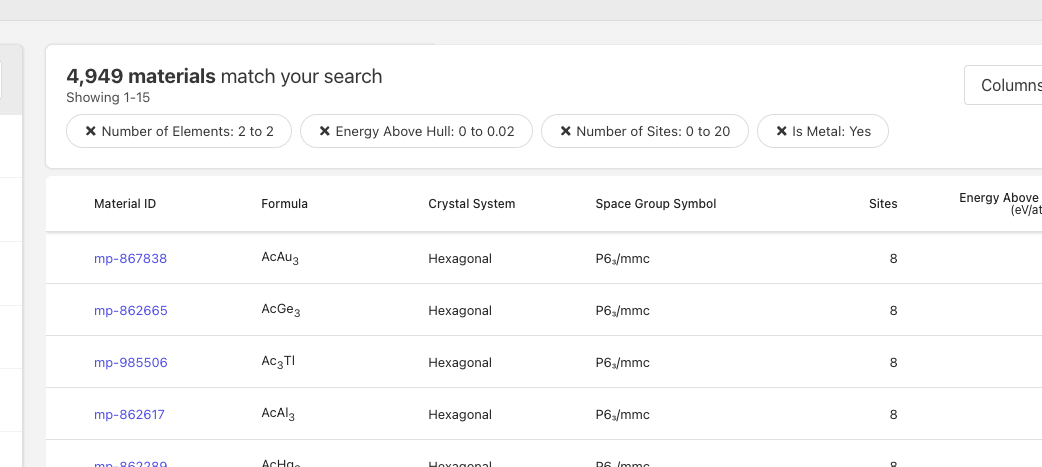
and if you compare that with whats available in the current version it’s gone up since last year (via the website):

So you could repeat the process with any of the database versions that are available in AWS.

I would recommend just trying out the database versions you think are relevant and make pandas dataframes and try to filter them as is useful to you. Everything I saw in your script file should be manageable using the dataframes (selecting the material_ids, formulas, etc.).


Re: the parquet dataset stuff: That was mostly just for general information and future reference. Concretely though:

Also, you mentioned that in the newly changed parquet dataset, the version entries disappear and it gets migrated from the existing one—
in this case, is it no longer possible to distinguish differences by version in the parquet dataset?

No, it will still be possible. The version will just be directly embedded in the data itself as a dedicated version field that can be used to filter/select certain (or multiple) versions.

Tsmathis, thank you for your kind reply.

First of all, I’m sorry for replying late even though you took the time to be so thoughtful.
There were a few issues, and I was hospitalized, so I couldn’t respond.

I read everything you wrote carefully.
The sad part is that the existing API usage method I studied hard before (such as the query code you provided earlier) is no longer usable.

Because I’m still not very familiar with the data side, this may be a somewhat basic question.
Is the upgraded parquet dataset something like pandas? I understood pandas as something like a “data storage” I used to work with.

Or, in addition, could it be that the explanation of a pandas dataframe and the commands in the form of df[ ~ ] that you showed below are not examples of how to query the new parquet dataset, but rather examples of how things work inside the existing API?

The code defined with df[ ~ ] above sorts everything at once through pandas, and the content under the quoted section above uses JSON—so that sounds like you were describing different code, right?

I don’t remember the exact date when I updated it, but when I last checked, it was 4,732.
Considering the number of data points in the information you provided, it’s likely that it’s data from before February, 2025.

Thank you for taking the time to review and reply with your confirmation.